ASFireWire GitHub
OPEN-SOURCE DRIVERKIT PROJECT MACOS 26

FireWire,
rebuilt for today.

ASFireWire brings IEEE 1394 back to modern macOS through DriverKit. Built over more than a year and tested across a broad range of real hardware, it supports audio interfaces, video cameras, and storage devices.

Free and open source · active development
Browse real-world audio, video, and storage test reports.
Current status ↗
ASFW / SYSTEM MAPIEEE 1394
01
macOSCoreAudio · SCSI · user space
HOST
02
ASFireWireDriverKit · AudioDriverKit · SCSIControllerDriverKit
ASFW
BUS POLICYASYNC I/OISOCHRONOUSDEVICE PROTOCOLS
03
OHCI controllerRegisters · interrupts · DMA
HARDWARE
IEEE 1394 BUSAudio · storage · DV · control
TRANSPORT▁ ▃ ▂ ▆ ▃ ▇ ▂ ▅ ▃ ▆ ▂ ▄ ▂ ▇ ▃ ▅CONTENT
INDEPENDENT DEVELOPMENTEST. IN OPEN SOURCE ↘
THE PROJECT

A free, open-source DriverKit project restoring selected FireWire functions on modern macOS.

01Audio

Audio support across multiple device protocols and chipset families, tested on real interfaces.

02Video

DV capture and AV/C tape transport control for MiniDV camcorders.

03Storage

SBP-2 devices such as Nikon film scanners through a SCSI host adapter.

A SIMPLE MODEL · FROM APP TO DEVICE

How it works.

Pick a device type to follow its path through macOS, ASFireWire, and the FireWire controller.

AUDIO · DUPLEXAudio travels in both directions
SELECT A STEP
Audio app

A DAW asks macOS to play or record. The same route carries recorded audio back to the app.

APPLICATION

Audio uses isochronous packets for the live stream. Separate asynchronous transactions handle discovery and device control. The ASFW app installs and manages the driver; it is not in the audio path.

01 HARDWARE COMPATIBILITY

Browse by device type.

A device listed as enabled in code may still need a real hardware test. Each result below says what has actually been reported.

01 / AUDIO

Audio interfaces

Interfaces are grouped by the protocol or chipset family identified in the project; the tag on each model separates tested hardware from code support.

CALL FOR TESTERS · v0.4.0-beta.4

AV/C startup fixes need wider hardware testing.

Share your result ↗

Beta.4 fixes AV/C startup when playback and capture initially report different sample rates, and hardens CMP connection cleanup. Phase 88 startup and streaming were confirmed on hardware after these fixes; other AV/C devices still need reports. Turn volume down before first attach.

  • AV/C devices (BeBoB, Oxford): best-effort supportThe rebuilt AV/C stack (PR #165) discovers a device from what it reports about itself: plugs, stream formats, channel names. Known devices keep their own tested setup. An unknown device gets read-only discovery using only command forms proven safe on real hardware, then streams with the standard IEC 61883 connection sequence at the rate it is already running.
    NEEDS TEST
  • DICE devices: best-effort support (v0.4.0-beta.1 and later)The DICE driver reads channel counts and sample rates from the device’s own registers (PR #166). Every recognised DICE model is enabled, and an unlisted DICE unit is recognised from its Config ROM alone, using the same rule as Linux. Before its first write, the driver checks that the device answers like a DICE.
    NEEDS TEST
  • Newly enabled DICE: Focusrite Liquid Saffire 56, Saffire Pro 26, Saffire Pro 40 (TCD3070); PreSonus StudioLive 16.4.2 and 32.4.2; Alesis iO14 / iO26; Mackie Onyx 1640i (DICE run) and Onyx Blackbird; Weiss ADC2, AFI1, Vesta, DAC2 / Minerva, DAC202, Maya and MAN301; plus any unlisted DICE unit.
  • Generic AV/C · BeBoB: Edirol FA-66, FA-101; PreSonus FireBox, FP10, Inspire 1394; TASCAM IF-FW/DM; Behringer FCA610/1616, X32 X-UF, UFX1204/1604; Apogee Rosetta, Ensemble; ESI Quatafire 610; Phonic Helix / FireFly; Lynx Aurora LT-FW; ICON FireXon; Prism Sound Orpheus, ADA-8XR; TerraTec Phase 24 / X24, Aureon 7.1; Yamaha GO44 / GO46; Focusrite Saffire, Saffire LE, Pro 10 I/O, Pro 26 I/O; Digidesign Mbox 2 Pro; Mackie Onyx FireWire card, d.2; Stanton ScratchAmp; CME MatrixKFW.
  • Generic AV/C · Oxford: TASCAM FireOne; Mackie Onyx Satellite and Onyx 1640i (Oxford run); Tapco Link.FireWire 4x6; Behringer F-Control 202; Griffin FireWave; LaCie FireWire speakers; Miglia HarmonyAudio.
  • Known limits: generic AV/C devices expose a single sample rate; Duet and Phase 88 expose discovered compatible rates. Playback-only AV/C devices are not published yet; units without usable timestamps (some Oxford 970) may play but not record. A DICE unit that powers up with an empty internal router can stream correctly yet stay silent: please say so if that happens. M-Audio FW410, Audiophile, Solo, Ozonic and NRV10 need a firmware upload first, which is not supported yet.
DICE · TC APPLIED TECHNOLOGIES

Tested and working

7 DEVICES
  • Focusrite Saffire Pro 24Hardware report confirmed.
    CONTRIBUTOR TESTEDWORKING
  • Midas Venice F24Hardware report confirmed.
    CONTRIBUTOR TESTEDWORKING
  • Avid Mbox Pro, 3rd generationReleased in v0.4.0-beta.1; hardware-tested by KinoLab07.
    CONTRIBUTOR TESTEDWORKINGIN RELEASE
  • Focusrite Saffire Pro 24 DSPHardware report confirmed.
    MAINTAINER TESTEDWORKING
  • PreSonus StudioLive 16.0.2Full duplex · 16 in / 16 out · @klochowicz
    CONTRIBUTOR TESTEDWORKING
  • Midas Venice F3232 × 32 · 44.1 / 48 kHz · @alicankaralar
    CONTRIBUTOR TESTEDWORKING
  • Focusrite Saffire Pro 4020 × 20 at 48 kHz · original TCD2220 revision · @evan-luther
    CONTRIBUTOR TESTEDWORKING
DICE · TC APPLIED TECHNOLOGIES

Enabled; test status varies

  • Focusrite Saffire Pro 14Enabled in code; hardware result not recorded.
    NEEDS TEST
  • PreSonus StudioLive 24.4.2Hardware capture exists; no streaming result recorded.
    NEEDS TEST
  • PreSonus FireStudio ProjectEnabled for v0.4.0-beta.1; earlier-branch report needs current-build retest.
    RETEST
  • Midas Venice F16Enabled through shared Venice profile; hardware result not recorded.
    NEEDS TEST
  • Alesis MultiMix 8 / 12 / 16Enabled from a register dump; streaming is not confirmed.
    NEEDS TEST
  • Weiss INT202 / INT203Enabled with a 2-channel DICE layout; not run against hardware.
    NEEDS TEST
BEBOB

BridgeCo / BeBoB protocol family

  • TerraTec PHASE 88 RackStartup and streaming confirmed on hardware after the beta.4 AV/C startup fixes.
    MAINTAINER TESTEDWORKING
  • M-Audio FireWire 181448 kHz · playback, capture, cold start
    MAINTAINER TESTEDWORKING
M-Audio ProjectMix I/OContributor tested and reported working. The tested build was not specified; a separate silent-capture report on 0.3.1-era builds has a suspected fix in v0.4.0-beta.1 that needs a retest.
CONTRIBUTOR TESTEDWORKING
OXFORD · AV/C

Oxford AV/C family

  • Apogee Duet FireWireHardware report confirmed.
    MAINTAINER TESTEDWORKING
  • Mackie Onyx-iEnabled; profile based on an 820i capture, audio not verified.
    NEEDS TEST
ECHO FIREWORKS

Echo Fireworks family

  • Mackie Onyx 400FEnabled; no audio-verified report on record.
    NEEDS TEST
MOTU PROTOCOL V2

MOTU family

  • 828mkII / UltraLiteEnabled; no audio-verified report on record. Revalidation requested after audio-engine changes.
    REVALIDATE
RME FIREWIRE

Fireface family

  • Fireface FF400 / FF80048 kHz duplex support since v0.4.0-beta.1; path and limits are in the changelog. The maintainer doesn’t have either model to test; contributor testing is needed.
    IN RELEASENEEDS TEST
RECOGNIZED · AUDIO NOT ENABLEDModels awaiting captures or profile work

These models are identified, but no audio path is enabled for them. Most models previously listed here are now enabled best effort; see the call for testers above.

  • MOTU: 896HD, Traveler and 8pre. Their fixed channel layouts are not interchangeable with the 828mkII / UltraLite.
  • Mackie: Onyx 1200F (Echo Fireworks run).
02 / VIDEO

DV camcorders

MiniDV capture and AV/C tape transport control.

CONTRIBUTOR VERIFIEDMACOS 26 · FIREWIRE 400
  • Panasonic MiniDV camcorderDV capture to raw .dv files; play / stop / rewind confirmed · @hoffmabc
    ●

Additional DV stream handling was hardened by @gdemontalivet. Reports from other models, especially NTSC cameras, are welcome.

LIMITATION

DV capture and audio receive share a resource

They both use isochronous receive context 0, so they cannot run at the same time. Starting one while the other is active returns “busy.”

03 / STORAGE

Scanners and SBP-2 devices

FireWire storage devices appear through the driver's SCSI host adapter.

CONTRIBUTOR VERIFIEDVueScan · Negpy (nkscan)
  • Nikon Coolscan 9000 (LS-9000)Scanning tested; sleep / wake and reconnect tested · @mhellevang
    ●
  • Nikon Coolscan 4000 (LS-4000)Plug and play; scanning at 2000 dpi tested · @mhellevangNegpy (nkscan) reported working on an M1 MacBook Pro running macOS Tahoe · contributor report by COXOS · 25 Sep 2026
    ●

Nikon Coolscan 8000: the older wiki says it should work, but the current README does not list a verification result. Treat it as unconfirmed.

04 / CONNECTION

Macs and FireWire adapters

Compatibility depends on the host controller as well as the peripheral.

DEVELOPMENT SETUP

Apple Thunderbolt adapter chain

Maintainer's setup: Thunderbolt 3 → Thunderbolt 2 → FireWire 800, on a 2020 M1 MacBook Air.

CONTROLLER MATCHING IS LIMITED

The current driver matches the Agere FW643 PCI ID. Other PCIe FireWire cards are not listed as supported; check the issue tracker before buying a card for this project.

i

The wiki contains additional detail but predates v0.4.0-beta.4. This page reflects the tagged README and release notes; release notes take precedence when statuses differ.

FIELD NOTES INTERFACE & BUS VIEWS

Screens from the bench.

Real screenshots from a development system. They show what macOS and the ASFW app displayed at capture time; they are illustrative and do not replace the hardware test results above.

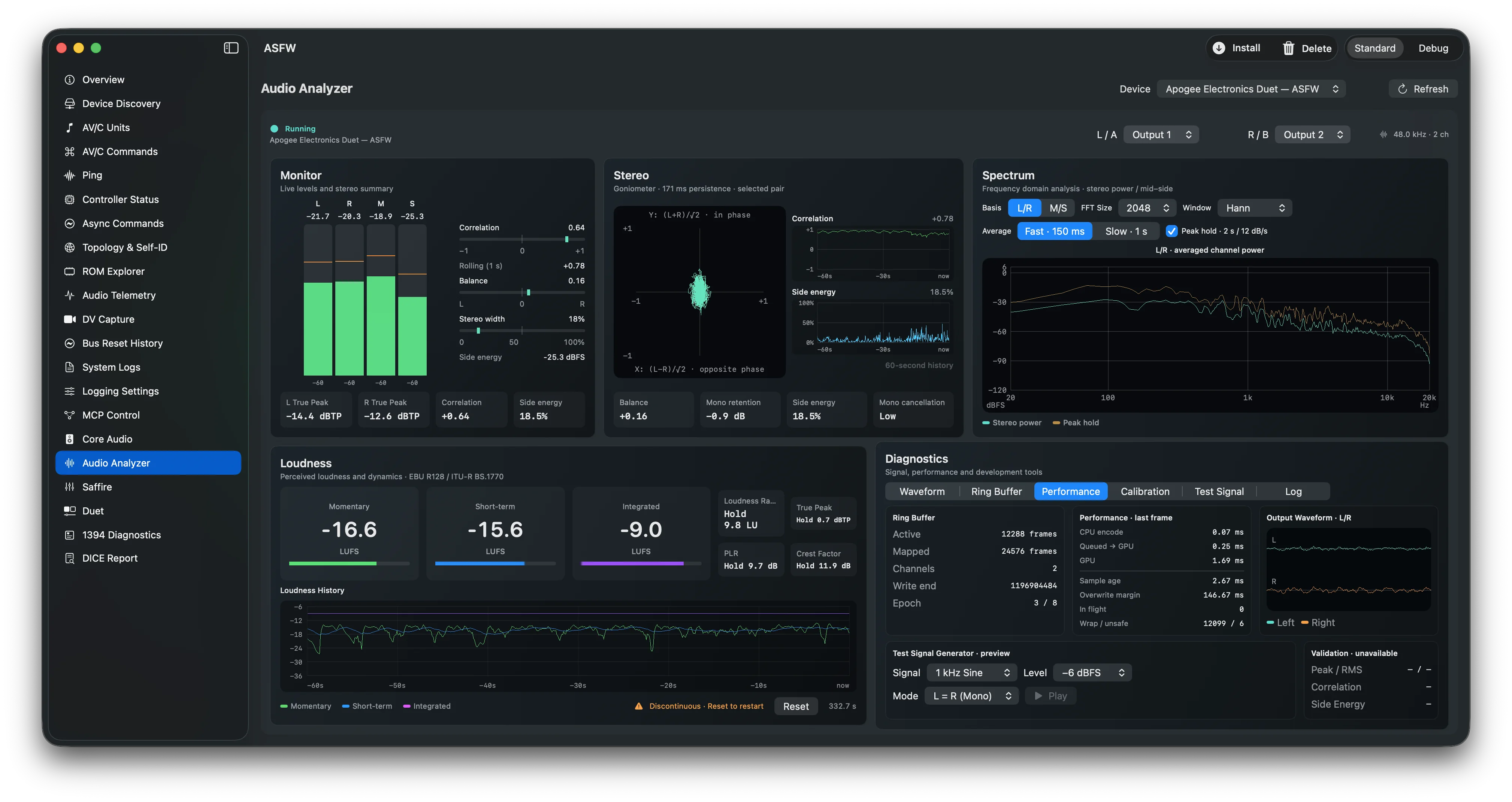
ASFW Audio Analyzer monitoring an Apogee Duet output, with level meters, stereo goniometer and correlation, spectrum, EBU loudness, waveform and performance diagnostics.
ASFW APP · REAL-TIME AUDIO ANALYSISAudio Analyzer · any ASFW interfaceA working prototype that turns any FireWire audio interface supported by ASFW into a real-time stereo analyzer. Select an output to inspect levels and true peak, stereo correlation and phase, L/R or M/S spectrum, and EBU R128 loudness, with waveform, ring-buffer and performance diagnostics. It currently supports 48 kHz only; this screenshot shows an Apogee Duet.
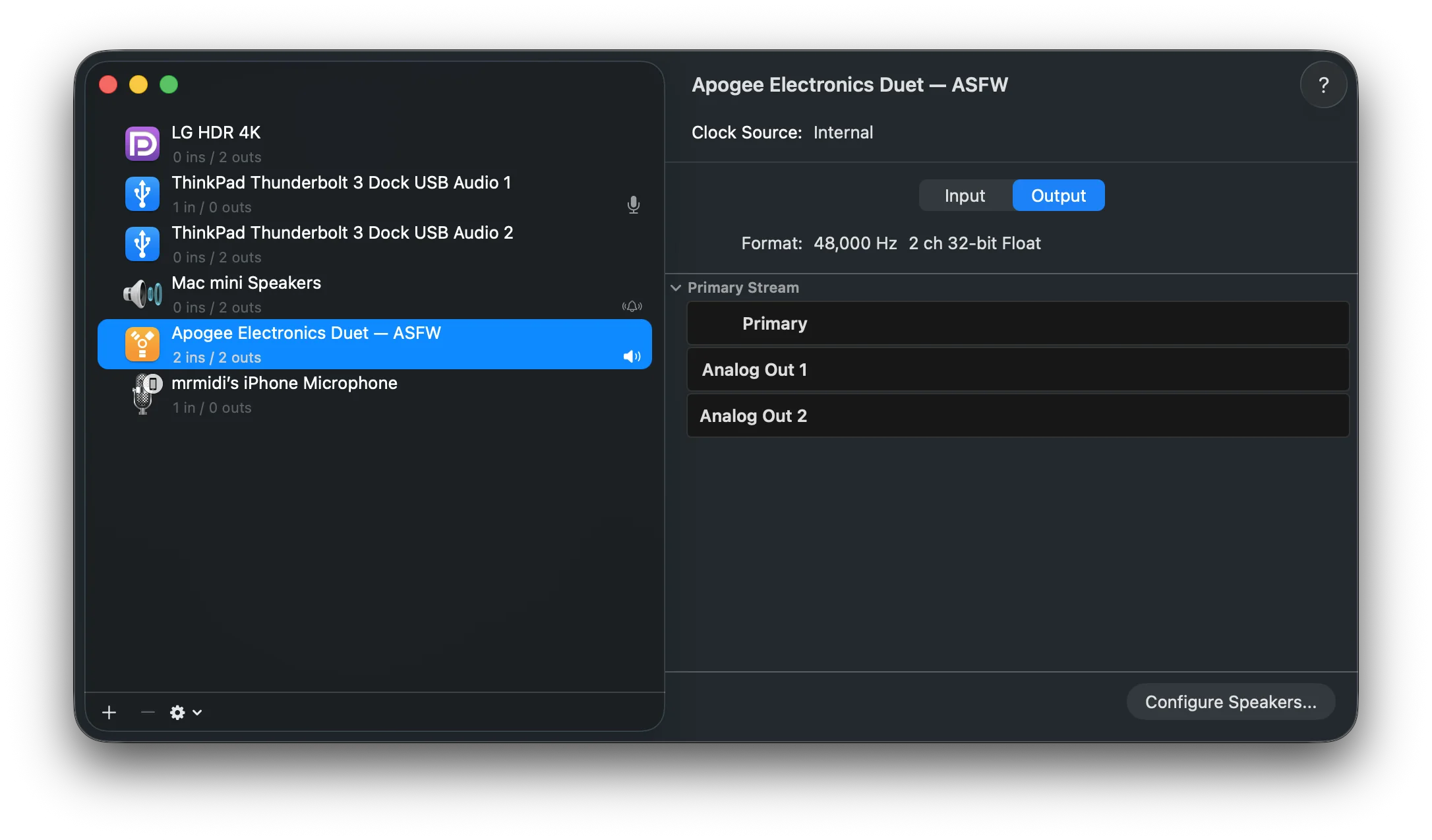
Audio MIDI Setup shows Apogee Electronics Duet — ASFW with 2 inputs and 2 outputs at 48 kHz.
AUDIO MIDI SETUP · AUDIO INTERFACEApogee Duet · Audio MIDI Setup2 inputs · 2 outputs · 48 kHz. ASFW carries 24-bit audio over FireWire. 🙂
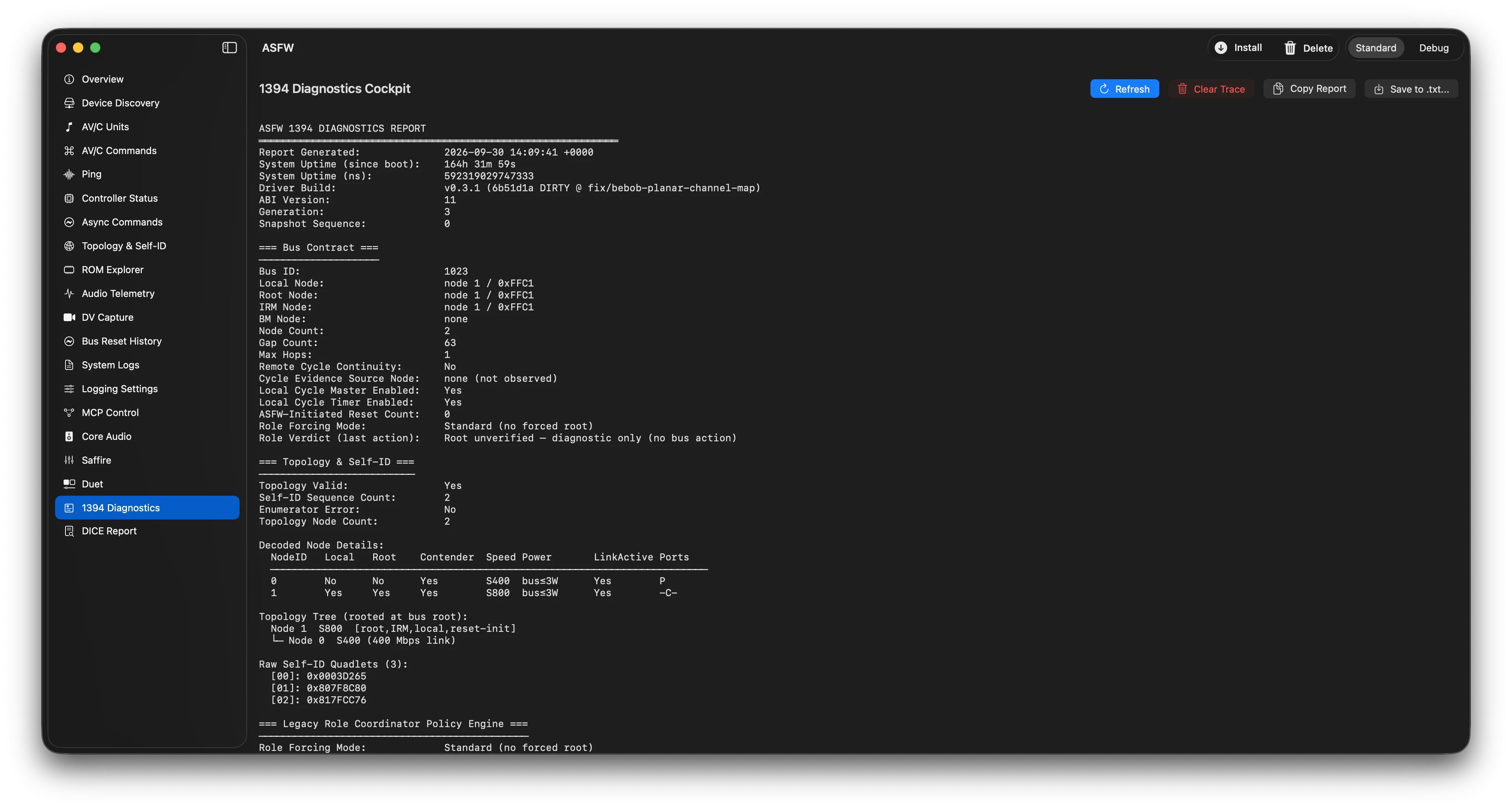
ASFW app open to 1394 Diagnostics, showing a generated report with bus contract and topology details.
ASFW APP · DIAGNOSTICS1394 DiagnosticsA bus and topology snapshot from a connected FireWire system.
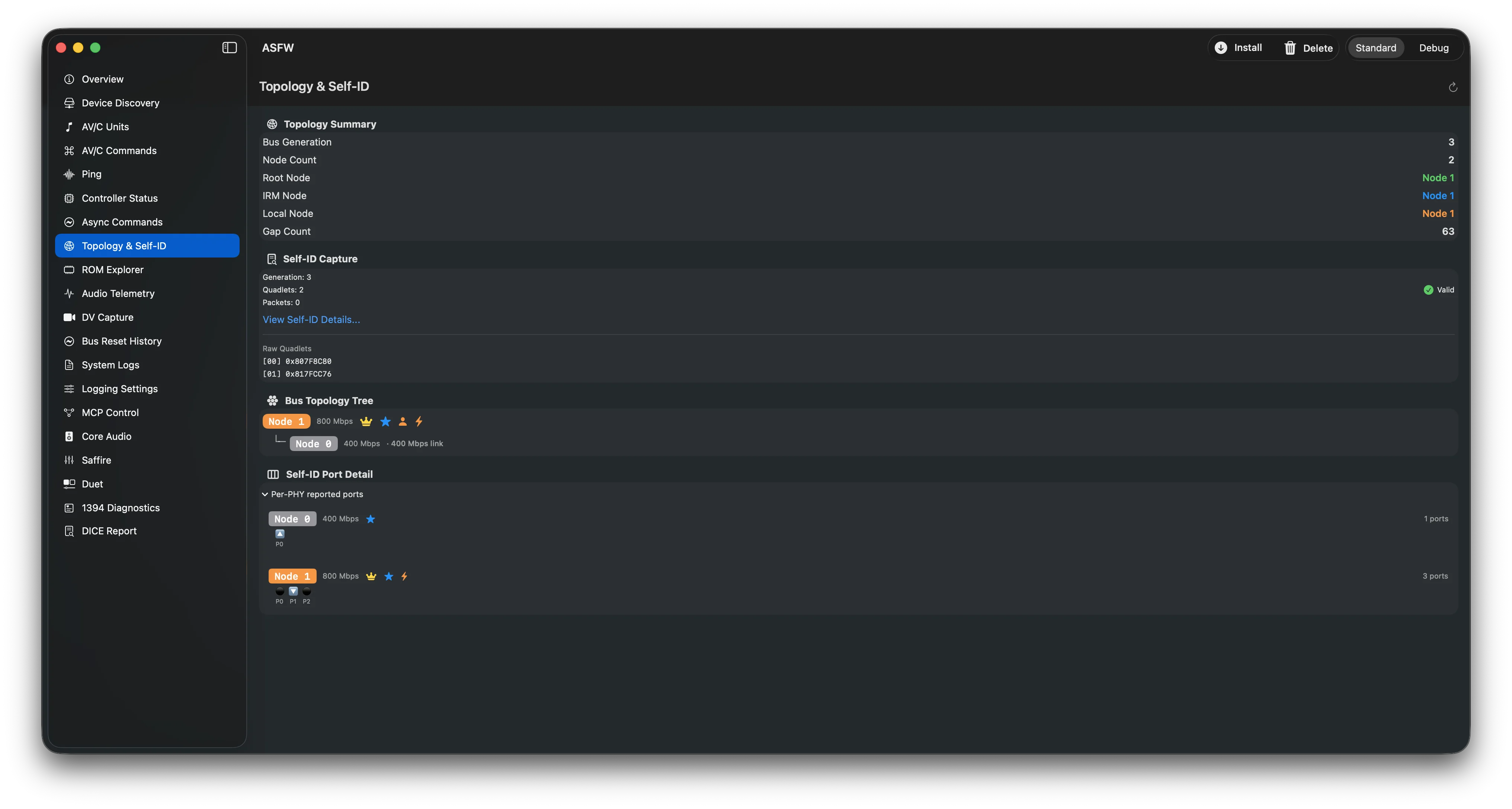
ASFW Topology and Self-ID view showing a valid self-ID capture and a two-node bus topology.
ASFW APP · BUS VIEWTopology & Self-IDThis capture shows a valid self-ID sequence and a two-node topology in the app.
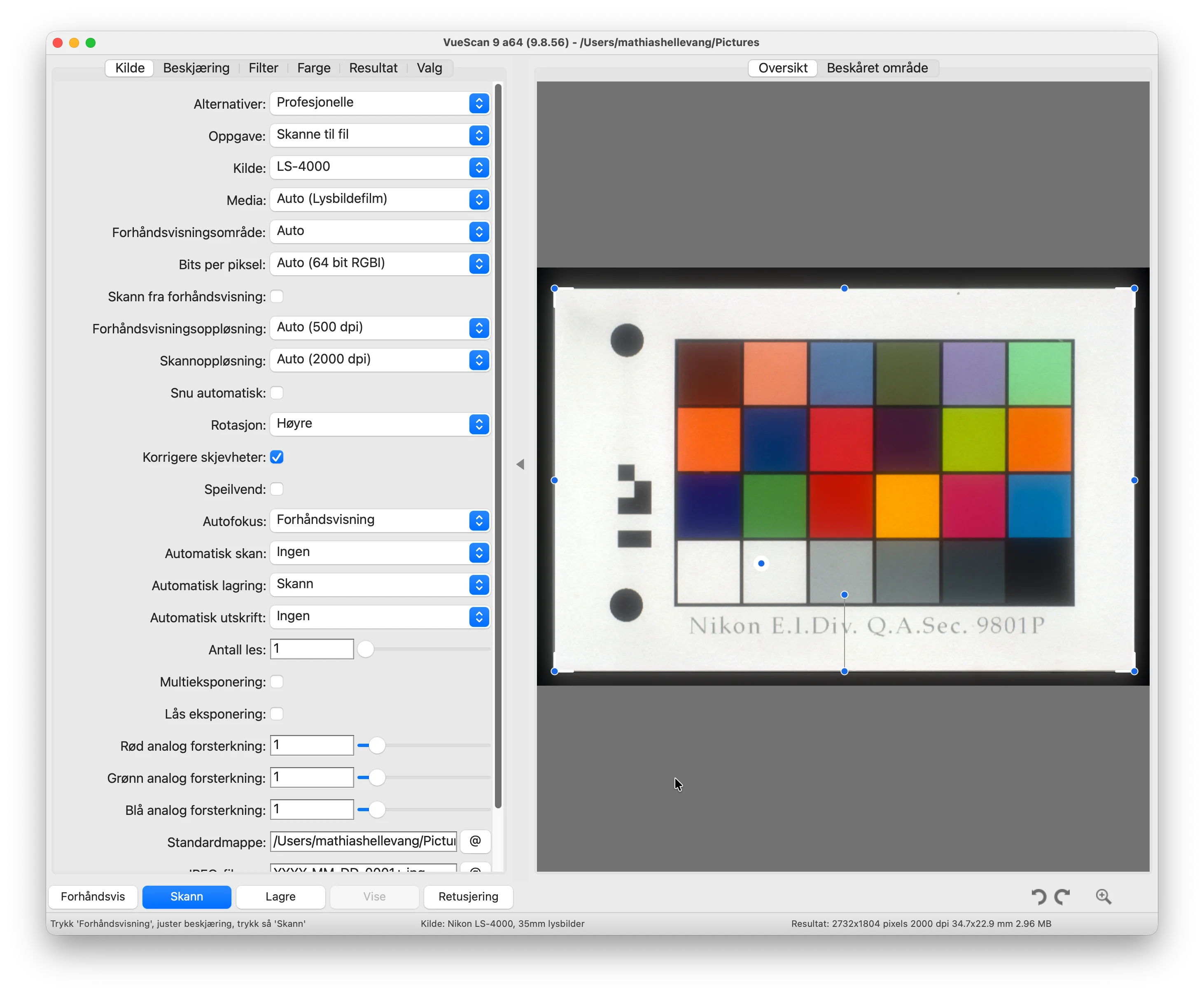
VueScan source settings show Nikon LS-4000 with an automatic 2000 dpi scan resolution and a color calibration target preview.
VUESCAN · NIKON FILM SCANNERNikon Coolscan 4000 in VueScanThe source is set to LS-4000 with 2000 dpi scan resolution. This is a preview and settings view, not a completed scan.
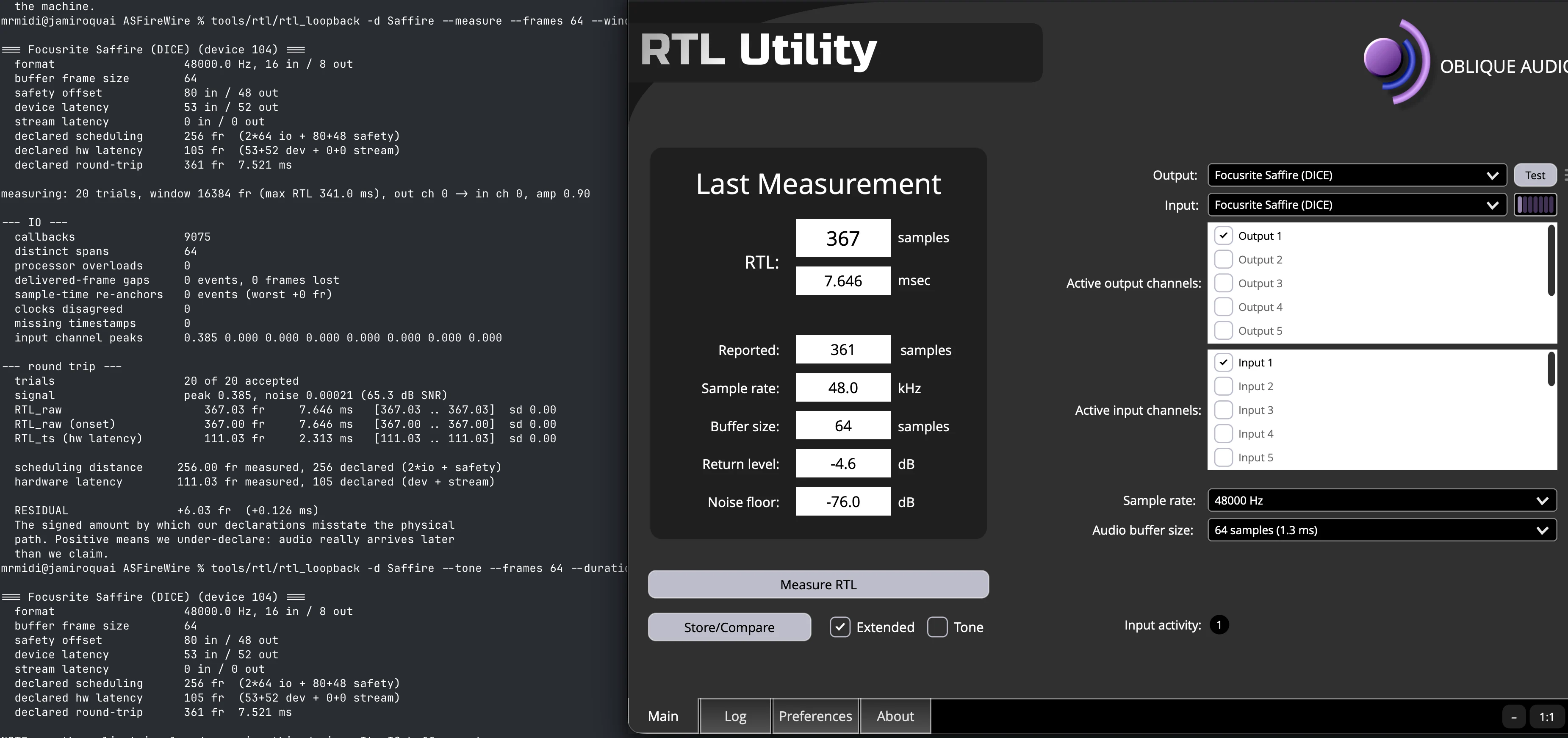
ASFW terminal output and Oblique Audio RTL Utility show the same 7.646 ms sample-accurate round-trip latency for a Focusrite Saffire at 48 kHz, with Output 1 and Input 1 selected.
AUDIO · SAMPLE-ACCURATE LATENCYFocusrite Saffire Pro 24 DSP · loopback RTLRTL (round-trip latency) is the time audio takes to leave an output and return at an input. Output 1 was physically connected to Input 1. ASFW’s sample-accurate measurement agrees with Oblique Audio’s RTL Utility. At 48 kHz, the latest build measures 7.021 ms; this screenshot shows an earlier 7.646 ms result.
02 USERS & TESTERS

Start with the right guide.

↗
TRY THE DRIVER

Install a tester release

Read the safety notes and the full installation steps before downloading. Pre-release packages are unsigned and must be signed locally before installation.

Read installation guide ↗
⌘
BUILD FROM SOURCE

Developer setup

Generate the Xcode project, build and sign locally, then explore the driver and app source.

Build & signing guide ↗
⌁
REPORT A RESULT

Share a device result

If it didn’t work, tell me what happened. If it did, share that too so others know what’s been tested.

Share your result ↗
!
Use with care · not recommended for production.

Installation requires disabling SIP, which weakens macOS security. Low-level driver behavior can crash macOS or cause a kernel panic. I have not noticed this for a long time, but there is no guarantee of safety. Use wisely on a non-production test Mac, then restore SIP after uninstalling.

Read the safety notes ↗
03 PROJECT UPDATES

Built in the open.

See what has changed, what is being worked on, and where hardware evidence is still missing.

LATEST TAGGED PRERELEASE · 4 OCT 2026

ASFireWire v0.4.0-beta.4

Fixes AV/C startup when playback and capture plugs initially report different sample rates, and hardens CMP timeout reconciliation and disconnect cleanup. Phase 88 startup and streaming were confirmed on hardware after these fixes. The cause of the previously observed delayed CMP response remains under investigation; Duet mute may still clear shortly after it is set.

Beta.4 release notes ↗Download beta.4 ↗
PREVIOUS TAGGED PRERELEASE · 4 OCT 2026

ASFireWire v0.4.0-beta.3

Beta.3 added generic AV/C Core Audio volume and mute controls and an 8192-point Audio Analyzer FFT.

All releases ↗
04 CONTRIBUTORS & SUPPORTERS

Good hardware evidence
moves this forward.

Try a supported device, report what works or fails, improve docs, write code, or help investigate protocol behavior. The project is free and open source; donations support the developer and make continued independent development possible.

05 CONTACT

Get in touch.